How to view Invoices
How to View Your Invoices
Step 1: Log in to your account
Open the customer portal and sign in using your login details.
Step 2: Click Invoices
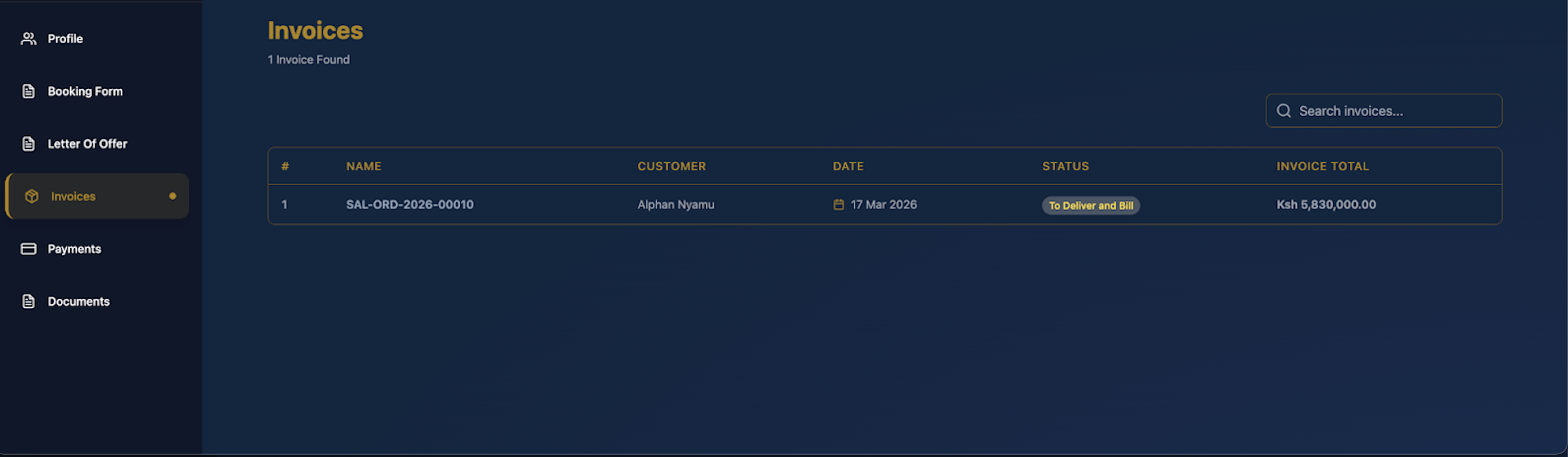
From the menu on the left side of the screen, select Invoices.
Step 3: View your invoice list
On the invoices page, you will see a list of all available invoices linked to your account.
Step 4: Check invoice details
Review the details shown for each invoice, such as the invoice number, date, status, and total amount.
Step 5: Use the search bar
If you want to find a specific invoice, use the search bar to search by invoice number or related details.
Step 6: Open the invoice
Click on the invoice you want to view to see more detailed information.
Step 7: Review the full invoice information
Check the invoice summary, billed items, payments made, and outstanding balance.