How to View and Access Your Profile
How to View and Access Your Profile
Step 1: Log in to Your Account
Open portal and sign in using your account credentials.
Step 2: Use the Left Menu Panel
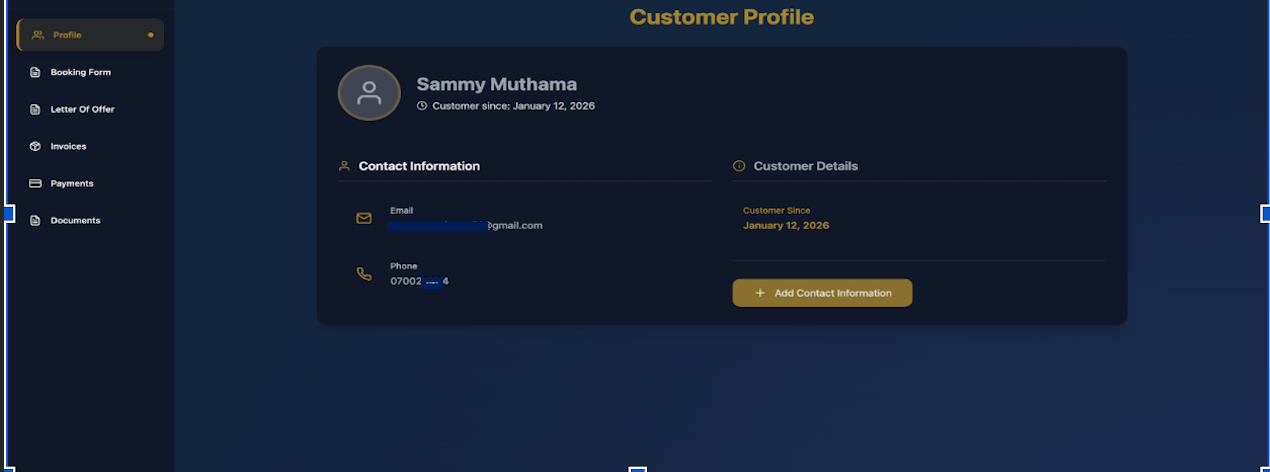
Once you are logged in, look at the navigation menu on the left-hand side of the screen.
Step 3: Click on Profile
Select Profile from the left menu. This will open your Customer Profile page.
Step 4: View Your Profile Details
On the Customer Profile page, you will be able to see your personal and account information, including:Your full name, Your email address, Your phone number,Your customer since date
Step 5: Review Contact Information
Under Contact Information, check the details provided, such as: Email address and Phone number. If some details are missing, they may appear as Not provided.
Step 6: Add or Update Contact Information
If you need to provide or update your details, click the Add Contact Information button on the right side of the page.
Step 7: Confirm Your Customer Details
Under Customer Details, review important account information such as the date you became a customer.