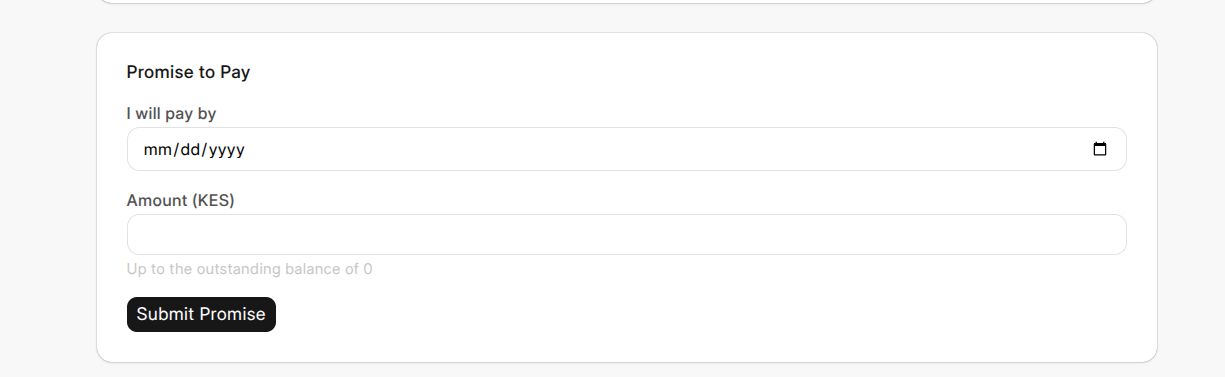
Making a Promise to Pay
Making a Promise to Pay
If a customer can't pay right away but knows when they will, they can make a Promise to Pay through the portal — committing to settle a specific invoice by a specific date. While that promise is active, the customer won't be chased for it.
How a customer makes a promise
- Open the invoice they want to make a promise against.
- Choose Promise to Pay.
- Select the date they commit to paying by (it must be a future date).
- Enter the amount they'll pay — this can be the full outstanding balance or a partial amount.
- Submit.
What happens next
The promise goes straight into the credit team's records, exactly as if a collector had logged it during a call. While the promise is active:
- Collections pause on that invoice — the customer isn't sent reminders for money they've committed to paying.
- The promise stays active until its date passes.
After the promised date, the system automatically checks whether the payment was made and marks the promise Kept, Partially Kept, or Broken — no manual follow-up needed. The customer can see the status from the My Requests tab.
Why it's useful
It gives customers a straightforward way to say "I will pay, just not today" and have that respected — instead of being chased while they're already planning to pay. It also keeps the credit team informed automatically, without a phone call.