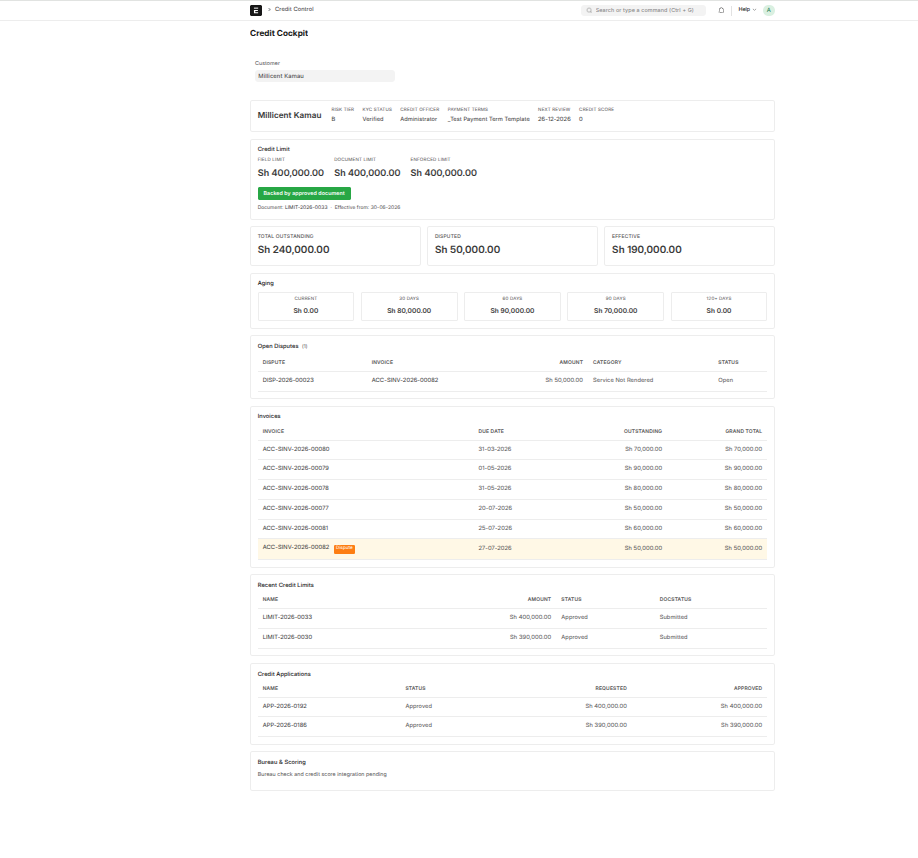
The Credit Cockpit
The AR Dashboard shows you everyone at once. The Credit Cockpit does the opposite: it shows everything about one customer on a single screen. When you're about to make a decision on a customer — extend more credit, chase a debt, review their account — this is the page you open. It gathers their limit, what they owe, their aging, their disputes, and their history into one view.
Open it from the workspace, or link straight to a customer.
Is the limit trustworthy?
At the top, the cockpit checks whether the customer's credit limit is backed by a properly approved Credit Limit document, and flags one of three states:
- OK (green) — the limit matches an approved document and matches what's enforced. All good.
- Unbacked (red) — a limit is in force that no approved document supports. A policy problem worth fixing — usually a number typed in directly instead of going through approval.
- Mismatch (amber) — there's an approved document, but the numbers don't agree. Worth investigating.
This is the cockpit's most useful feature for a credit manager — it surfaces limits that exist without a paper trail, exactly the kind of thing that causes trouble in an audit.
What the customer actually owes
The exposure section breaks the balance into three figures:
- Total outstanding — everything they owe
- Disputed — the portion under an open dispute, isolated from credit calculations
- Effective exposure — total minus disputed; the number that actually counts against their limit
If a customer owes 240,000 but 70,000 is disputed, their effective exposure is 170,000 — and that's what determines how much more credit they have available.
Aging, disputes, and history
The rest of the cockpit fills in the detail: this customer's aging buckets, any open disputes, and their recent limits and applications — their credit history at a glance.
Built for scale
The cockpit loads only the selected customer's data, and long lists (invoices, disputes, limits, applications) show the most recent items with a "View all" link to the full list. So even a customer with a thousand invoices loads cleanly — you get an accurate summary up top and a one-click path to the full detail.